In the context menu (after clicking the middle mouse button), there is a submenu called “History”. When you hover over it, it displays the folders you have recently visited.
The problem is that I often have folders with the same name in different locations, for example:
D:\Client-A\Projects
D:\Client-B\Projects
D:\Client-C\Projects
D:\Client-D\Projects
When I perform operations on these folders, the “History” menu eventually shows only the name of the final folder, in this case “Projects”. This makes the feature practically useless, because at a glance there is no way to tell which folder is located where (sometimes I have 10 same names)
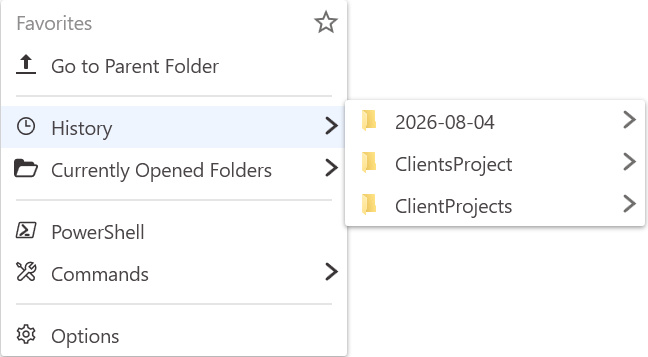
This was handled very nicely in Listary 5, where the full path to the folder was visible.
Would it be possible to add path display in the latest version 7, so that the path is immediately visible? It could be displayed in a smaller font underneath the destination folder name, similar to how it is currently displayed in the search results.
I have one more suggestion. Would it be possible to add an option that allows users to hide the other items in the middle-click context menu and leave only “History”, or alternatively move “History” to the very bottom of the menu? Something like below visualisation.
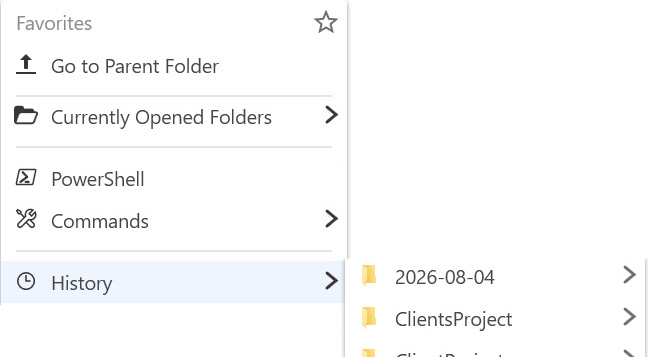
In Listary 5, “Recent” was located at the very bottom, which made it much easier to move the mouse directly to that position.
Best regards, and thank you in advance for considering my suggestions.