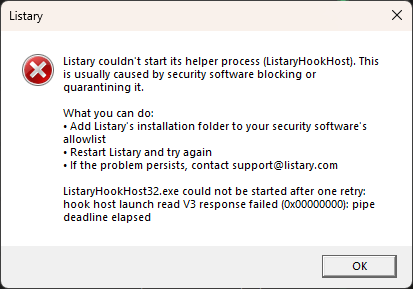
After installing the latest version of Listary (v7.1.0.43), Listary does not want to start. This error you see in the image has never happened to me before in a Listary installation. And this is happening after a clean install of Windows 11 26H2 build 26300.9711
I reinstalled Listary and restarted my PC, but this error still appears every time I start Listary.
I found the solution. The problem is that Listary needs the latest version of the Visual C++ Redistributable to work. I had installed the latest version of the Visual C++ Redistributable included with Visual Studio Community, which is 14.52.37025.0. I had to uninstall that version and install the latest version of the Visual C++ Redistributable downloaded from Microsoft’s official website, which is 14.51.36247.0, and with this version, Listary now starts up.
I hope Listary will be compatible with version 14.52 of Visual C++ in the future.
Thanks for tracking this down and sharing the fix. Starting with 7.1.0.45, Listary no longer needs the Visual C++ runtime at all, so the runtime version on your PC doesn’t matter anymore. You can update from Options > About > Check for Updates.