Example:
So when I type: listary c:\ in the fast menu it doesn’t type c:\ in the Files Beta window, it only opens the window.
Is there something wrong with this command, if there is nothing wrong with this command but isn’t added yet, can you please add this.
Kind Regards.
Lily
July 31, 2025, 10:16am
2
Hi @kalesow115 ,
I’ll explain it to you.
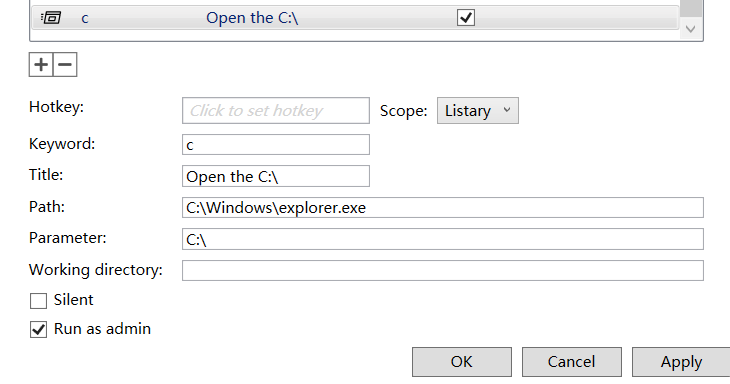
Path : Program to open the folder, e.g. Windows Explorer (C:\Windows\explorer.exe).
Parameter : Target to open, e.g. folder path (C:\).
Here’s how you can set up a command in Listary to open a folder directly:
Create a new custom command :
Keyword : Enter any keyword you like (e.g., DiskC)Title : Enter any name you like (e.g., Open the C:\)Path : Set to the program you want to use for opening folders,
C:\Windows\explorer.exe
Parameter : Set to the folder path you want to open.
C:\
Apply the command.
I’m not sure if I got your meaning right, please let me know if I’m mistaken.
You explain above how to open folder in explorer.exe.
Open Listary Launch (CTRL+X2).
Type Listary "C:" Press Enter = Example: Folder.
Type Listary “Listary” Press Enter = Example: Listary Icon Image.
When open it opens Listary Beta Files Manager.
Then it type C:\ (Folder) or Listary (File) inside Listary Beta Files Manager.
Reason it is usefull I don’t need to open Listary Beta Files Manager manually everythime if I want to look at an folder or file.
I can type immediatly what I want to search.
Also I only need to remember only one hotkey instead of two hotkeys.
Lily
August 5, 2025, 3:40am
4
I think I may have understood your request.
You can press Ctrl twice to open the launcher, type your search term, then press Ctrl twice again to directly jump to Listary Beta with your typed keyword already filled in.
By default, in Listary Options → Hotkey , the setting for When pressing again is Switch to file search (Listary Beta).
Not enterly what i mean but is definally usefull.
Lily
August 18, 2025, 2:16am
6
We’ll consider this, Thanks for the idea.
1 Like